

Get your arts and entertainment news from New Zealand
Provided by AGP
CortexForge Introduces Client-Owned Operational Intelligence Category for Organizations Outgrowing Disconnected Tools
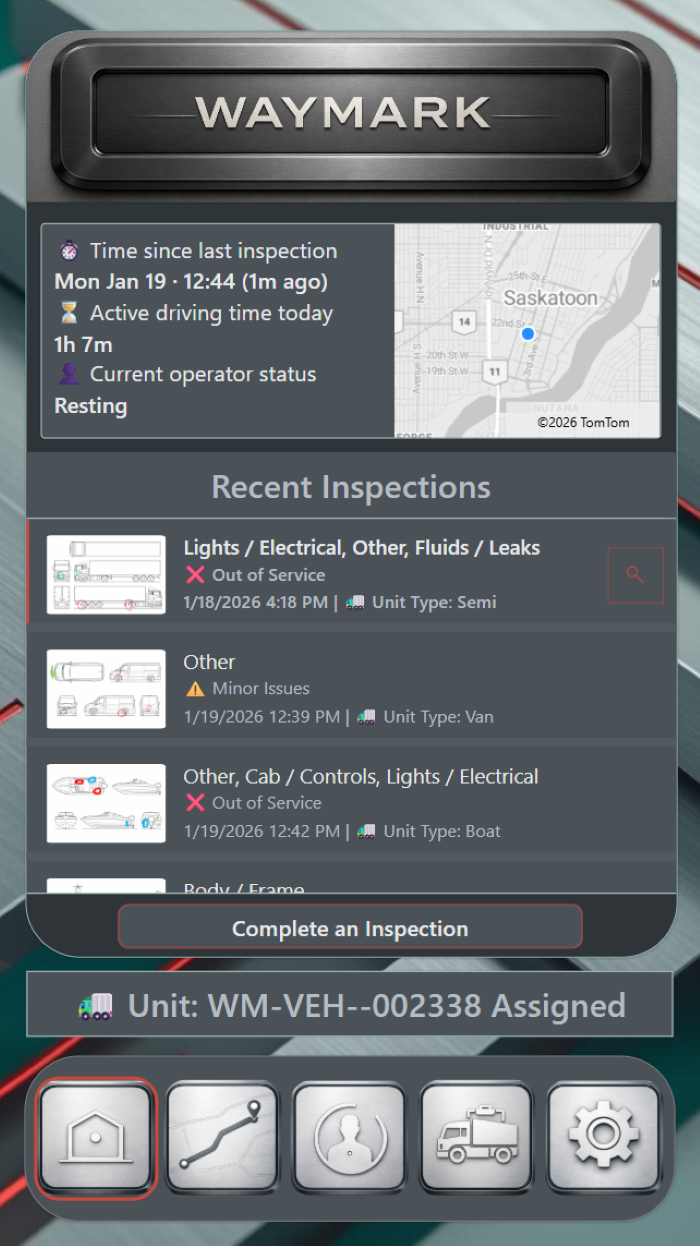
WayMark | Foundations Division - demonstrates how fleet and transportation teams can bring vehicle status, inspections, route context, and operator activity into one client-owned operational intelligence system.
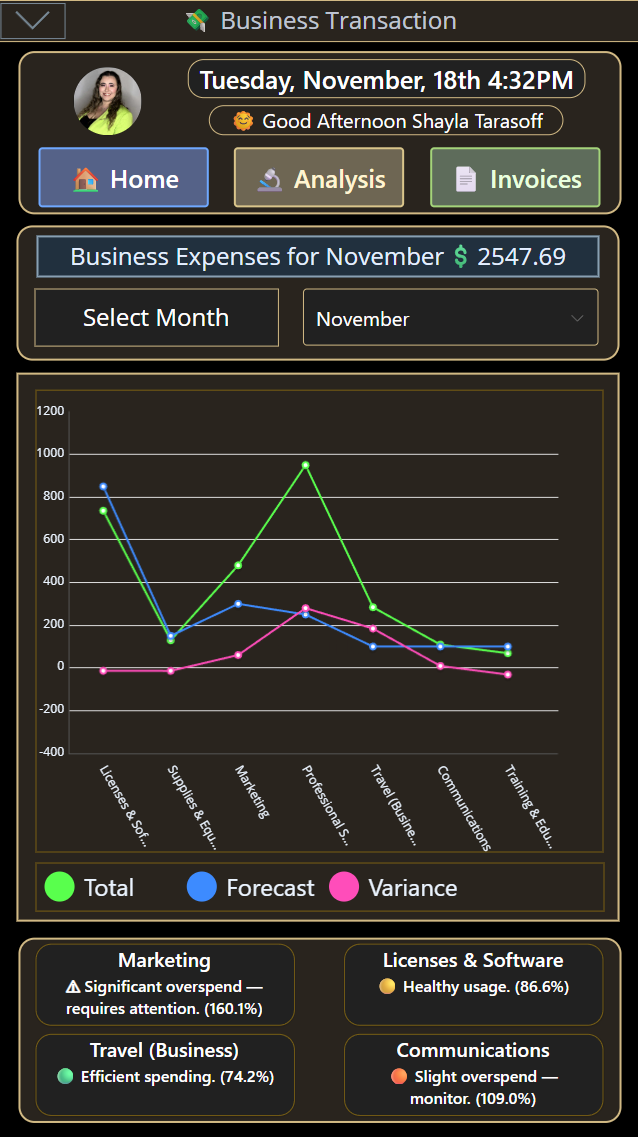
Treasury Vault | Executive Division - shows how financial activity can be turned from scattered transactions into clearer expense tracking, analysis, and executive insight.
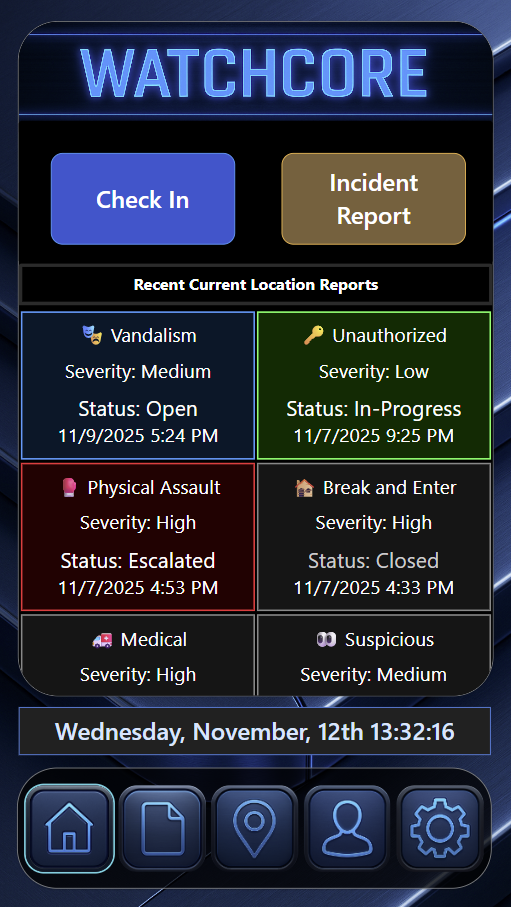
WatchCore | Applied Field Division - shows how field teams can capture live updates, incident reports, check-ins, and risk signals inside one coordinated operational view.
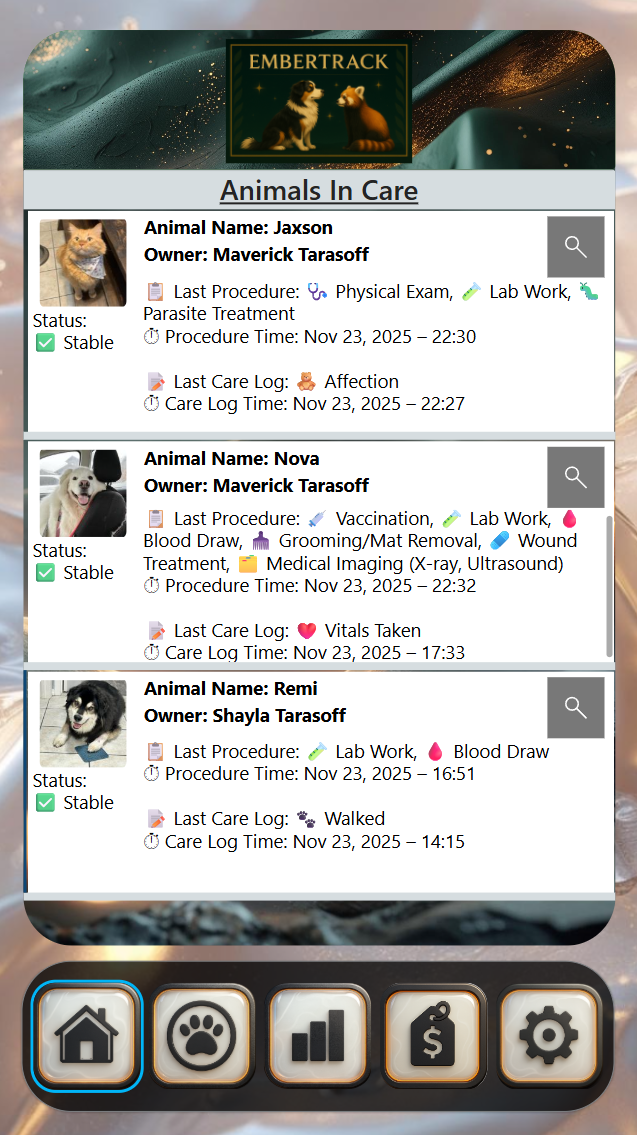
EmberTrack | Intelligence Division - demonstrates how animal care teams can keep profiles, procedures, care logs, treatment status, and billing context connected in one system.
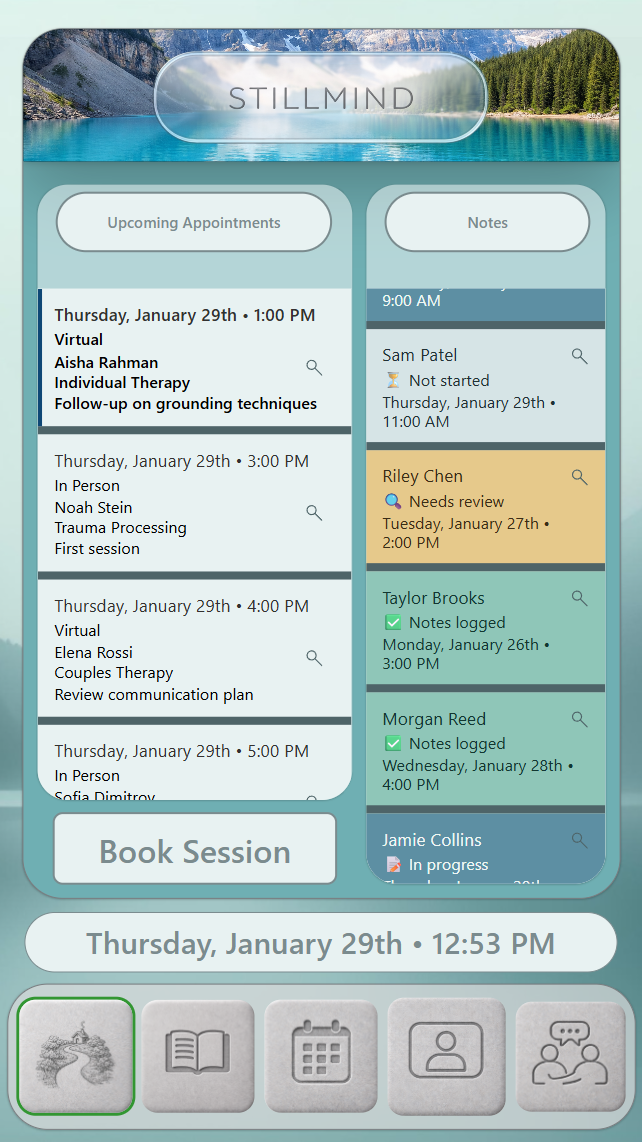
StillMind | Showcase Division - demonstrates how clinical documentation, appointments, check-ins, and note review can be organized into a calmer continuity-of-care system.
Saskatchewan firm introduces client-owned operational intelligence systems built in Microsoft environments to keep data controlled and reduce vendor dependency.
Technology shouldn't demand endless resilience from workers; it must help create it. Our client-owned systems of trust bring structure and calm without losing the human side of complex work.”
— Shayla Tarasoff
SASKATOON, SASKATCHEWAN, CANADA, May 15, 2026 /EINPresswire.com/ -- CortexForge Consulting Inc., a Saskatchewan-founded technology consultancy, is outlining the category behind its work: client-owned operational intelligence systems built for organizations whose daily operations have outgrown disconnected tools and manual tracking.
Many organizations are not short on software. They are overloaded by it.
Across industries, teams are paying for more platforms, more subscriptions, more user seats, more integrations, and more dashboards — while their daily work still depends on spreadsheets, inboxes, paper forms, shared folders, and human memory.
That creates a simple but serious problem: when important work is spread across too many places, it becomes harder to know what happened, what needs attention, who is responsible, and whether decisions are being made from complete information.
The firm builds these systems inside a client’s own Microsoft environment, leveraging technology many organizations already own or govern:
• Architecture: Microsoft Power Platform & Dataverse
• Intelligence: Power BI & Responsible AI Workflows
• Governance: Microsoft 365 & SharePoint
Instead of moving sensitive work into another external software platform, CortexForge builds within technology many organizations already use, govern, and understand.
This means the client keeps the system. The client keeps the data. The client keeps control.
The goal is to reduce dependency on disconnected vendors, unnecessary third-party tools, exposed integrations, and fragile manual processes. Sensitive operational information stays inside the organization’s own environment, where access, security, permissions, records, and governance can remain under the client’s control.
CortexForge also applies responsible AI principles through its dedicated Ethics Division, helping ensure AI is used as a controlled assistant rather than an unchecked authority.
For readers who want a plain-language overview of the firm’s work, CortexForge Atlas explains how CortexForge helps organizations turn scattered work into clear digital tools people can use on a computer, tablet, or phone. It also outlines the firm’s focus on Microsoft Power Platform, responsible AI workflows, people-first system design, and practical systems that reduce pressure instead of adding to it.
CortexForge describes this approach as building systems of trust.
In plain language, a system of trust is a digital operating layer that helps people record important work clearly, preserve context, review history, understand risk, and make better decisions without losing human judgment behind the process.
These systems are not generic apps. They are structured environments built around how real organizations function. They can support frontline staff, managers, executives, clinicians, operators, caregivers, property teams, and decision-makers by turning day-to-day activity into organized, usable intelligence.
CortexForge also brings a human-centered design philosophy to this work. Its systems are shaped by trauma-informed design, ethical AI principles, and a dedicated focus on clarity, calmness, accountability, privacy, and human authority. The purpose is not to replace people with technology. The purpose is to give people better tools for complex work.
The following examples show how this category applies across different operational environments, including animal care, financial intelligence, transportation, property management, and clinical documentation.
Together, they demonstrate a simple idea: when information is organized, owned, understandable, and trustworthy, organizations can operate with greater clarity and confidence.
Citadel Matrix
Citadel Matrix is a property management system that keeps building information, tenant details, maintenance records, permits, floor plans, and location data in one organized place.
It is designed for property owners, facilities teams, landlords, building managers, and organizations that manage multiple spaces or buildings.
Instead of keeping important property information spread across emails, spreadsheets, folders, paper files, and separate contact lists, Citadel Matrix brings everything together so teams can quickly understand what is happening across their properties.
Each building can have its own record with key details such as location, usage, financial status, compliance progress, active issues, maintenance history, permits, inspections, floor plans, tenants, leases, and contacts. This gives staff one reliable place to look when they need answers.
For daily operations, Citadel Matrix provides a clear snapshot of the property portfolio. Teams can see recent updates, high-risk properties, open issues, resolved issues, and anything that needs attention. This helps managers spot problems earlier instead of discovering them after they grow.
The system also helps with tenant and contact management. Staff can check who occupies a unit, review lease context, and find the right contact without searching through disconnected lists.
For documentation, Citadel Matrix allows users to submit records such as permits, maintenance notes, inspection findings, attachments, and floor plans directly to the correct building. This keeps important information tied to the right property and easier to find later.
Floor plans can also be stored and viewed inside the system. Users can open a specific floor, zoom in, pan around, and understand the layout without relying on memory or second-hand explanations.
The main purpose of Citadel Matrix is to make property management clearer, faster, and more dependable.
It helps teams know what each building is, where it is, who uses it, what condition it is in, and what needs attention next.
WayMark
WayMark is a transportation and fleet management system that keeps vehicle information, inspections, routes, repairs, and time records in one clear place.
It is designed for teams that manage trucks, vans, equipment, delivery units, or other vehicles. Instead of relying on paper logs, text messages, separate apps, or memory, WayMark keeps each record connected to the right vehicle and the right moment.
For drivers and operators, WayMark makes daily reporting simple. The system shows the assigned vehicle, current status, inspection history, driving time, rest time, and route details. Drivers can quickly log inspections, change duty status, record notes, and flag problems before they become bigger issues.
If something is wrong with a vehicle, the driver can mark the exact spot on a diagram instead of trying to explain it in a long paragraph. This makes the problem easier for mechanics to understand.
For mechanics, WayMark keeps the original inspection details intact. They can see what the driver reported, review the marked diagram, add their own findings, document repairs, and decide whether the vehicle is safe to return to service. This creates a clear handoff between the person who noticed the issue and the person who fixed it.
For owners and managers, WayMark provides a broader view of fleet health. They can see which vehicles are active, which are out of service, which routes are moving, what inspections found, and where problems are appearing over time.
The system also keeps operator notes, mechanic notes, location details, route history, and service decisions connected in one record. This makes it easier to answer questions later without confusion or argument.
The main purpose of WayMark is to keep transportation work organized, honest, and easy to follow.
It helps teams know what happened, where it happened, who handled it, and whether each vehicle is ready for the road.
Treasury Vault
Treasury Vault is a financial tracking and reporting system for leaders who need a clear view of where money is going.
Instead of having expenses spread across receipts, spreadsheets, bank records, emails, and separate reports, Treasury Vault brings financial information into one organized place. It helps a business see its spending, understand patterns, and make decisions with better information.
The system allows staff or leaders to enter expenses in a structured way. Each transaction can include details such as the type of expense, category, priority level, notes, and receipts. This makes the data cleaner, easier to review, and easier to trust later.
Treasury Vault also provides dashboards that turn those transactions into useful financial insight. Leaders can quickly see spending totals, recent activity, category breakdowns, changes over time, and areas that may need attention.
For example, the system can help show whether spending is increasing, whether certain categories are becoming more expensive, or whether actual costs are moving away from the expected plan. This helps leaders notice problems earlier instead of finding them after they have already grown.
The dashboard acts like a financial command centre. It gives a high-level view of the organization’s financial activity while still allowing users to filter down into specific transactions, time periods, categories, priorities, or expense types.
This makes it easier to answer questions like: What are we spending money on? Which costs are growing? Are there unusual expenses? Which areas need review? Are we staying aligned with our financial plan?
The main purpose of Treasury Vault is to help leaders move from scattered financial records to clear financial awareness.
It does not just store expenses. It helps turn everyday financial activity into a reliable picture of business health, spending behaviour, and operational momentum.
WatchCore
WatchCore is a field coordination system for teams working in high-risk, fast-moving environments.
It helps responders, supervisors, and leaders stay connected through one shared source of live information. Instead of relying on scattered radio calls, texts, paper notes, memory, or delayed updates, WatchCore keeps important field activity in one clear system.
For frontline staff, WatchCore makes it easy to report what is happening in real time. Responders can log incidents, check in, add notes, attach files, and have severity levels automatically assigned through custom AI, even while moving. The system can also save the time and location automatically, which helps create a more accurate record without slowing people down.
This means the people closest to the situation can share what is happening as it unfolds, rather than trying to rebuild events later from memory.
For supervisors, WatchCore turns those field updates into a live coordination view. They can see recent incidents, staff check-in status, activity across sites, and reports that may need follow-up. This helps them track pace, spot problems early, verify who is safe, and make better decisions while operations are still active.
For executives and senior leaders, WatchCore provides a higher-level view of the organization’s operational health. Instead of showing every small detail, it highlights important patterns, trends, and risk signals. This allows leaders to see where issues may be building, where resources may be needed, and how the system is functioning overall.
WatchCore is also designed to protect clarity under pressure. It supports accountability, improves handoffs, and helps ensure that decisions are based on current information rather than guesswork.
The main purpose of WatchCore is simple: help teams act faster, coordinate better, and stay safer.
It turns fragmented field updates into one reliable operational picture so the right people can see what is happening, respond with confidence, and maintain control when conditions are changing quickly.
EmberTrack
EmberTrack is a digital care system for animal shelters, clinics, rescues, and other animal care teams.
It helps staff keep all important animal information in one organized place, instead of relying on paper notes, memory, text messages, spreadsheets, or scattered records.
Every animal has a clear profile that can include their name, photo, medical needs, behaviour notes, allergies, medications, procedures, and ongoing conditions. This gives staff a trusted place to check important details before feeding, handling, treating, or monitoring an animal.
The system also makes daily care easier to record. Staff can quickly log things like meals, medication, symptoms, behaviour changes, mobility issues, bleeding, side effects, recovery progress, and other wellbeing signals. These updates are saved with the time, animal, and category, so the team can see what happened and when.
EmberTrack is built for both frontline staff and managers.
For frontline caregivers, it provides fast tools for logging care in the moment. This helps reduce missed details during busy shifts and makes handovers easier between staff.
For managers, EmberTrack turns those daily updates into a clear overview of animal health, clinic activity, treatment history, animals currently in care, and outstanding payments. Staff can see which animals are staying on-site, what care they recently received, whether they are stable, and what still needs attention.
It can also support billing by showing medication and procedure costs in one place, organized by animal, owner, and visit date.
The main purpose of EmberTrack is simple: help animal care teams make better decisions by giving them accurate, up-to-date information.
It protects animals by making their needs easier to see, easier to track, and harder to forget.
StillMind
StillMind is a clinical documentation system for therapists, supervisors, and care teams.
It keeps sessions, appointments, check-ins, notes, and review records in one calm, organized place. Instead of relying on notebooks, scattered drafts, memory, emails, or separate calendars, StillMind connects each clinical record to the right client, session, date, and provider.
For therapists, StillMind helps organize the clinical day. Appointments are shown in order, with the client, time, session type, delivery method, and focus visible at a glance. This helps therapists prepare for each session without searching through different places.
When a session begins, the therapist selects the correct client and scheduled appointment before entering the session space. This reduces the chance of documenting under the wrong client or carrying forward the wrong context.
StillMind also supports simple client check-ins. A client or therapist can record how things are going across areas like mood, wellbeing, workload, and relationships using easy sliders. These check-ins give the therapist a quick snapshot of the client’s current state before or during the session.
After the session, notes can be captured directly in the system. Each note has a clear status, so therapists can see what is complete, unfinished, or needs attention later. Past sessions remain organized by date and client, making it easier to review history and maintain continuity of care.
For supervisors, StillMind provides an oversight space. Supervisors can review session logs, see which notes are awaiting review, check therapist attribution, monitor schedules, and view records within a specific date range.
The main purpose of StillMind is to protect clinical continuity.
It helps care teams know who was seen, when the session happened, what was documented, what still needs review, and how each record connects to the broader care timeline.
Demonstrator Systems and Tailored Client Builds
The systems shown in this release are demonstrator environments built with mock data. They are designed to show the kinds of operational problems CortexForge can help organizations solve, without exposing real client information, private records, or sensitive operational data.
These examples are not fixed products or one-size-fits-all templates. They are working demonstrations of a broader design approach: turning scattered information into clear, client-owned systems that support real work.
CortexForge does not build the same solution twice.
Every organization has its own workflows, risks, responsibilities, language, people, constraints, and decision points. A system that works for one clinic, property team, fleet operator, nonprofit, municipality, or executive office should not simply be copied into another environment without understanding how that organization actually operates.
CortexForge begins by learning the client’s real process: where information gets lost, where work slows down, where pressure builds, and where better structure would make the biggest difference.
From there, each system is tailored to the organization it serves.
The screenshots and examples in this release show what is possible. The actual client work begins with the client’s own environment, data boundaries, operational needs, and people.
Maverick Tarasoff
Cortex Forge Consulting Inc.
email us here
Visit us on social media:
LinkedIn
Facebook
Instagram
Other
Citadel Matrix | Foundations Division
Legal Disclaimer:
EIN Presswire provides this news content "as is" without warranty of any kind. We do not accept any responsibility or liability for the accuracy, content, images, videos, licenses, completeness, legality, or reliability of the information contained in this article. If you have any complaints or copyright issues related to this article, kindly contact the author above.
